Get your clients through Cyber Essentials, and keep them there
Helios checks every Windows machine against the Cyber Essentials technical controls each day, and fixes most of what fails with one press. Nine of its thirteen checks have a fix built in. You get a readiness report under your own name to hand the client, and it is included in every plan.
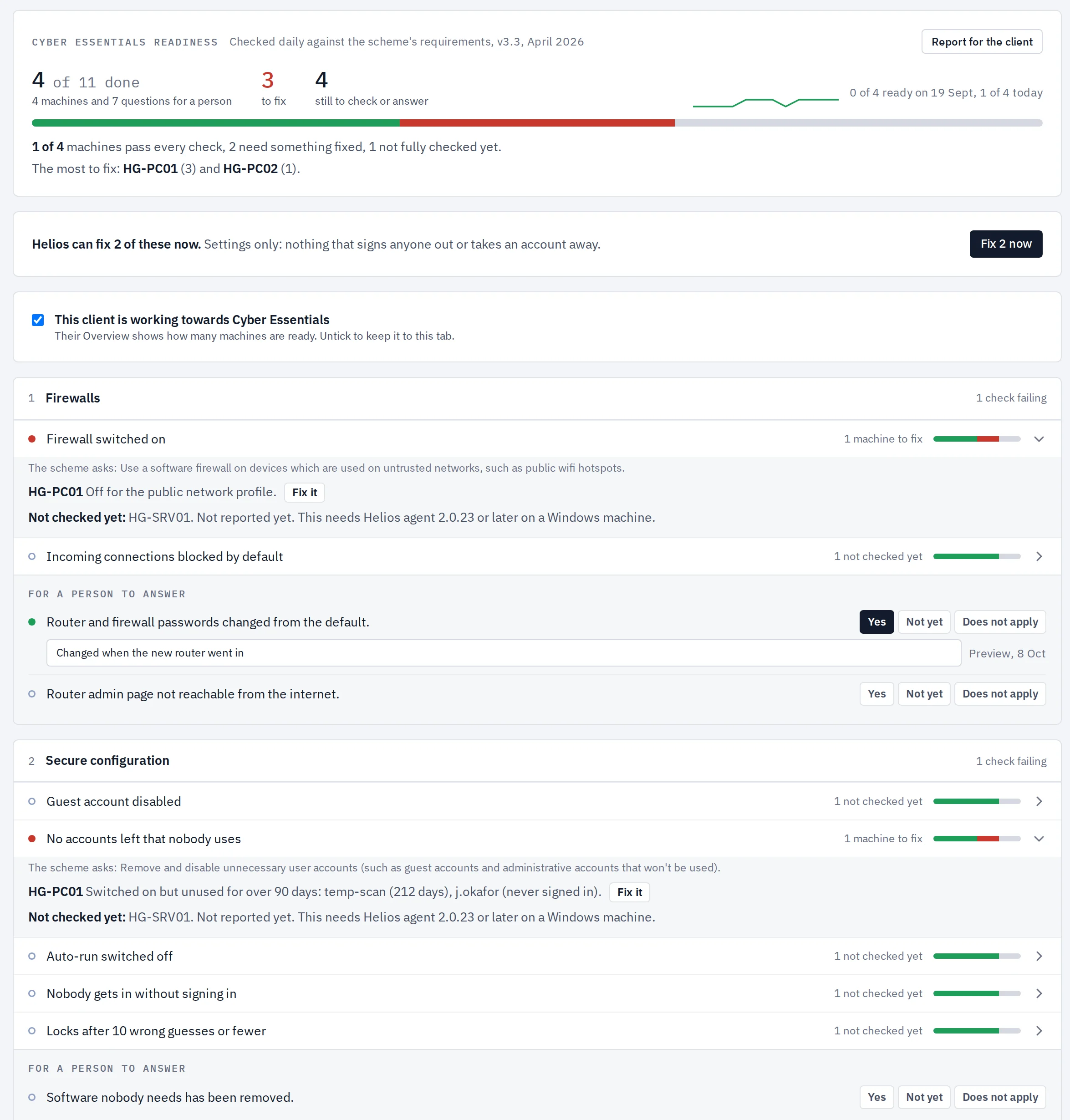
What Cyber Essentials asks for
Cyber Essentials is the UK government-backed scheme for basic cyber security. An organisation answers a self-assessment, a Certification Body marks it, and the certificate lasts a year. The requirements, version 3.3 from April 2026, are set out under five technical controls: firewalls, secure configuration, security update management, user access control and malware protection.
Most of those requirements are settings on each computer. One laptop with the firewall off, an old account nobody disabled, or an update a month overdue, and the answer on the form is no. Finding that laptop is the slow part, and it has to be done again at every renewal.
It fixes, not just reports
A report that lists forty failed settings leaves you with forty jobs. Helios does the jobs. Beside each failing machine is a Fix it button, each check has one button for every machine failing it, and each client has one button that fixes everything Helios can.
- One press, no questions: firewall on, incoming connections blocked by default, Guest account off, auto-run off, lock after 10 wrong guesses, overdue critical and important updates installed, Microsoft Defender switched back on.
- One press after a yes: disabling accounts nobody uses and turning automatic sign-in off. These take something away from somebody, so Helios names exactly what will change and asks first. Nothing is ever deleted.
- Left to a person: taking away someone's administrator rights, replacing an operating system that is out of support, and removing software its maker no longer fixes. Helios names the machine and says what to do.
Every fix was run on real Windows machines before it shipped, with the setting read back from Windows afterwards. The machine is checked again within the hour, so you see the fix land.
What Helios checks on each machine
The Helios agent reads these settings on every Windows machine and checks them again each day. Each line quotes the requirement it comes from.
| Control | Checked on every Windows machine | For a person to confirm |
|---|---|---|
| Firewalls | Firewall on for every network profile. Incoming connections blocked by default. | Router and firewall passwords changed from the default. Admin page not reachable from the internet. |
| Secure configuration | Guest account off. No accounts left switched on that nobody has used in 90 days. Auto-run off. Nobody gets in without signing in. Locks after 10 wrong guesses or fewer. | Software nobody needs has been removed. |
| Security update management | Operating system still supported. No software its maker has stopped fixing. No critical or important update waiting more than 14 days. Updates install without anyone asking. | Phones, tablets and routers are supported and updated. |
| User access control | The person who uses the machine day to day is not an administrator. | A process to approve accounts. Multi-factor authentication on every cloud service. Administrator accounts used for administration only. |
| Malware protection | Antivirus running and up to date. |
Where Microsoft 365 is connected, Helios also shows how many people have multi-factor authentication set up, next to the question it answers.
How an MSP uses it
- Open the client. The Cyber Essentials tab shows how many machines pass every check, how many need something fixed and which to start with.
- Fix what fails. Press the one button to fix everything Helios can, then work through what is left. Each failing check names the machine and says what is wrong in plain words.
- Answer the rest. The things no agent can see, such as router passwords and multi-factor authentication on cloud services, are questions you answer once, with a note. They count towards the same progress figure.
- Hand over the report. One button gives a readiness report with your name and logo on it, ready to print or save as a PDF. It lists the devices in scope with their makes and operating system versions, which the assessment asks for.
- Keep them there. The checks run every day. For a client you have marked as working towards the certificate, Helios opens a ticket the day a machine that passed stops passing. The tab shows a renewal warning from 60 days before the certificate runs out.
Mark a client as working towards Cyber Essentials and the count appears on their overview. Leave it unmarked and it stays out of the way.
For an in-house IT team
The scheme is the same whether you look after one organisation or fifty. Run your own company as a client in Helios and the tab becomes your checklist: what stands between you and the certificate, by machine.
The honest limits: this is a readiness check, not a certificate. Only a Certification Body can award Cyber Essentials, and the assessment also covers routers, phones and cloud services that no agent on a PC can see. The one-press fixes are mostly for Windows. Linux machines report the same settings where they exist on Linux: firewall, accounts, automatic updates, remote sign-in and waiting security updates. On Linux, Fix it covers the firewall, unused accounts and automatic updates. Macs are checked for a supported operating system, overdue updates and antivirus only.
Questions people ask
Does Helios make a client Cyber Essentials certified?
No. Helios shows how ready the computers are and what to fix. The certificate comes from a Certification Body after the organisation completes the self-assessment.
Which version of the requirements does it use?
Version 3.3 of "Cyber Essentials: Requirements for IT Infrastructure", published by the National Cyber Security Centre in April 2026.
Can Helios fix what it finds?
Yes, for nine of the thirteen checks. Seven are fixed with one press and two after you confirm what will change. The other four need a person, and Helios says what to do.
How often are the machines checked?
Every day. Each machine reports its settings to Helios, and the tab shows the latest reading.
Does it cost extra?
No. It is part of Helios on every plan, from £4 a device a month for 5 to 25 devices, then a flat £99, £199 or £399 a month for up to 50, 250 or unlimited devices.